
Headers tab of web site properties allows you to customize custom HTTP headers that are sent from the web server to the client browser. Custom headers can be used to send instructions from the Web server to the client browser that are not yet supported in the current HTTP specification, such as newer HTTP headers that IIS may not inherently support at the time of the product's release. For example, you can use a custom HTTP header to allow the client browser to cache the page but prevent proxy servers from caching the page.
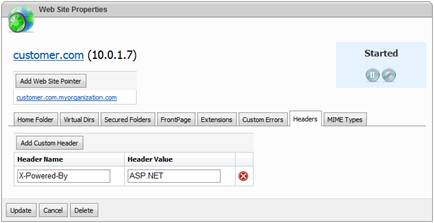
To add a new header click Add Custom Header button, specify header name and header value in corresponding fields. After youve added or modified headers click Update button to update web site settings.